




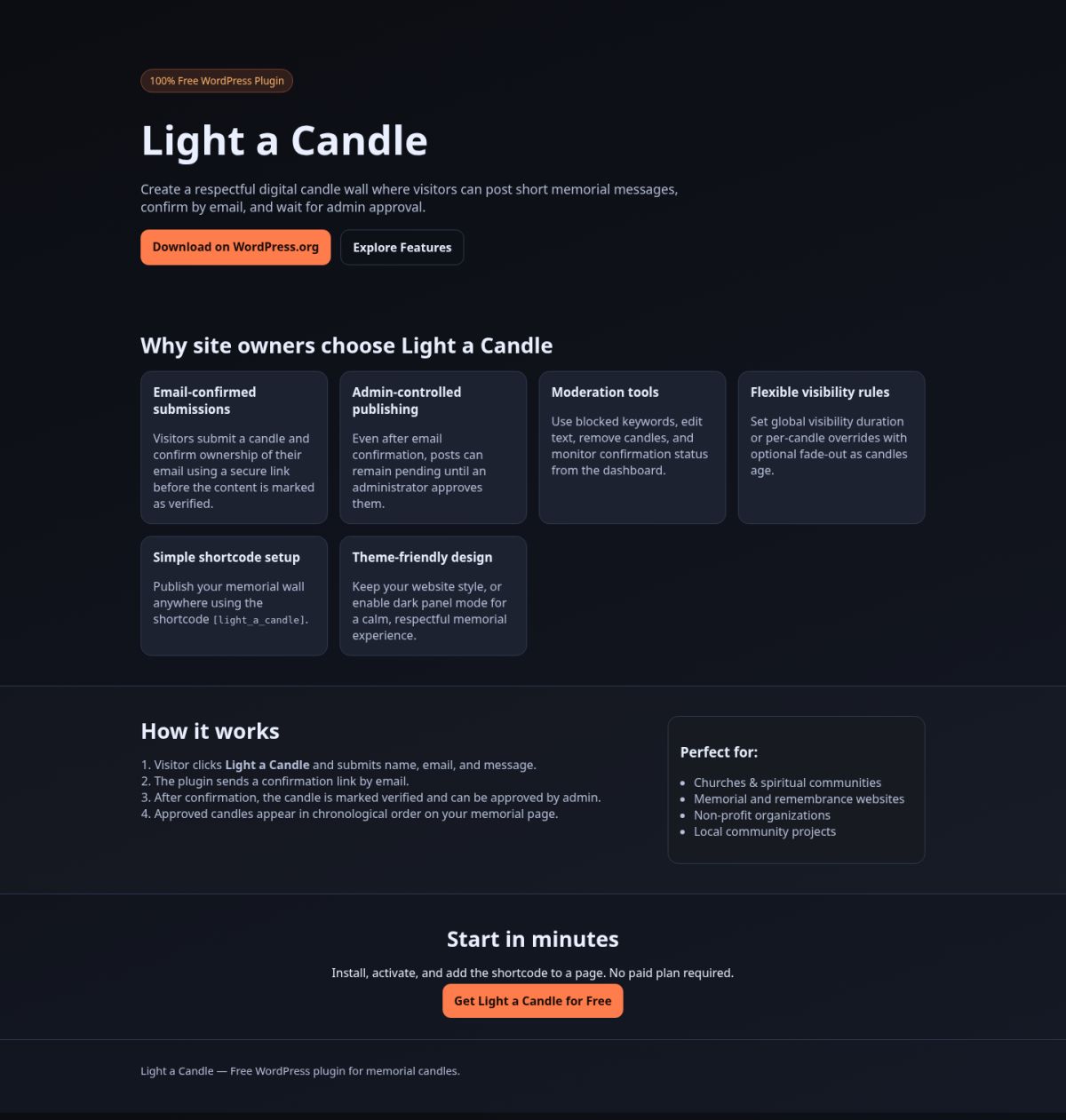
 100% Free WordPress Plugin
Light a Candle
Create a respectful digital candle wall where visitors can post short memorial messages, confirm by email, and wait for admin approval.
Why site owners choose Light a Candle
Email-confirmed submissions
Visitors submit a candle and confirm ownership of their email using a secure link before the content is marked as verified.
Admin-controlled publishing
Even after email confirmation, posts can remain pending until an administrator approves them.
Moderation tools
Use blocked keywords, edit text, remove candles, and monitor confirmation status from the dashboard.
Flexible visibility rules
Set global visibility duration or per-candle overrides with optional fade-out as candles age.
Simple shortcode setup
Publish your memorial wall anywhere using the shortcode.
Theme-friendly design
Keep your website style, or enable dark panel mode for a calm, respectful memorial experience.
How it works
- Visitor clicks Light a Candle and submits name, email, and message.
- The plugin sends a confirmation link by email.
- After confirmation, the candle is marked verified and can be approved by admin.
- Approved candles appear in chronological order on your memorial page.
Start in minutes
Install, activate, and add the shortcode to a page. No paid plan required.
Get Light a Candle for Free
Live Demo
Readme
Contributors: Nicolae Sfetcu
Tags: candle, memorial, prayer, tribute, shortcode
Requires at least: 6.0
Tested up to: 6.9
Requires PHP: 7.4
Stable tag: 1.0.0
License: GPLv2 or later
License URI: https://www.gnu.org/licenses/gpl-2.0.htmlVisitors can light virtual candles with email confirmation, moderation, and expiration controls.== Description ==
Light a Candle lets visitors submit a short message (max 140 chars), then confirm their candle by email before publication.
Features:
* Front-end shortcode with candle gallery and submission form.
* Automatically creates a public page (`/light-a-candle/`) on activation.
* Email-confirmation flow (double opt-in style).
* Chronological display (newest first).
* Global visibility period in days (or unlimited).
* Per-candle visibility override (priority over global rule).
* Optional fade-out effect as candles near expiration.
* Admin can edit candle text, delete candles, and moderate by blocked keywords.
* Configurable sender name/address and mail diagnostics in settings.
* Admin can optionally publish unconfirmed candles from dashboard settings.
* Admin can resend confirmation emails from each candle edit screen.
* Optional dark mode (black background / white text) for the candle wall panel (button + candles area).
== Installation ==
1. Upload the plugin folder to `/wp-content/plugins/light-a-candle/`.
2. Activate the plugin through the ‘Plugins’ menu in WordPress.
3. The plugin auto-creates a public page named **Light a Candle** (slug `light-a-candle`) containing the shortcode.
4. (Optional) Create your own page and use the shortcode.
5. Configure settings in **Light a Candle → Settings**.
== Frequently Asked Questions ==
= Why doesn’t a candle appear immediately? =
Because visitors must click the confirmation link sent to their email, and then admin must approve the post.
= Can I moderate content? =
Yes, use blocked keywords and manual edit/delete from the Candles admin list.
= Why are confirmation emails not received? =
Some servers can hand off mail successfully (`wp_mail=true`) but external domains still do not receive it. Check Mail diagnostics and verify server/IP reputation plus SPF, DKIM, DMARC.
= Why do candles stay pending in admin? =
Pending status is expected until the visitor confirms by email. If needed, admin can allow manual publishing for trusted submissions from plugin settings.
= What happens after email confirmation? =
The candle remains pending and receives a confirmation marker in admin, so editors can review and approve it manually.
= Can admin send confirmation manually? =
Yes. Open a candle in admin and use the **Send confirmation email now** button in the Candle Details box.
== Changelog ==
= 1.0.0 =
* Initial release.
Live Demo
Note: The plugin was submitted to wordpress.org but, due to the massive number of plugins awaiting review, the review queue is currently longer than normal, so the current wait for an initial review is at least a month.
Discover more from MultiMedia
Subscribe to get the latest posts sent to your email.


Reviews
There are no reviews yet.