




Thinking of leaving Instagram—for good or just for a while? Here’s the current, no-nonsense guide to deleting or deactivating your account, plus what to do before you pull the plug.
Before you delete: 3 quick prep steps
- Download your data (photos, videos, messages, etc.). You can request an export from Accounts Center → Your information & permissions → Download your information (wording may vary slightly). Instagram’s Help Center explains how the export works.
- Know the timelines. If you request deletion, you have 30 days to change your mind by logging back in; after that, the account is permanently removed from active systems, though cleanup can take up to 90 days on the backend.
- Understand the Threads link. Deleting your Instagram also deletes your linked Threads profile. Deleting Threads alone does not delete your Instagram.
Option A — Permanently delete your Instagram account
You can delete from the app or a web browser via Meta’s Accounts Center.
On iPhone/Android (Instagram app):
- Go to your profile → ☰ (menu) → Settings & activity (or Settings & privacy).
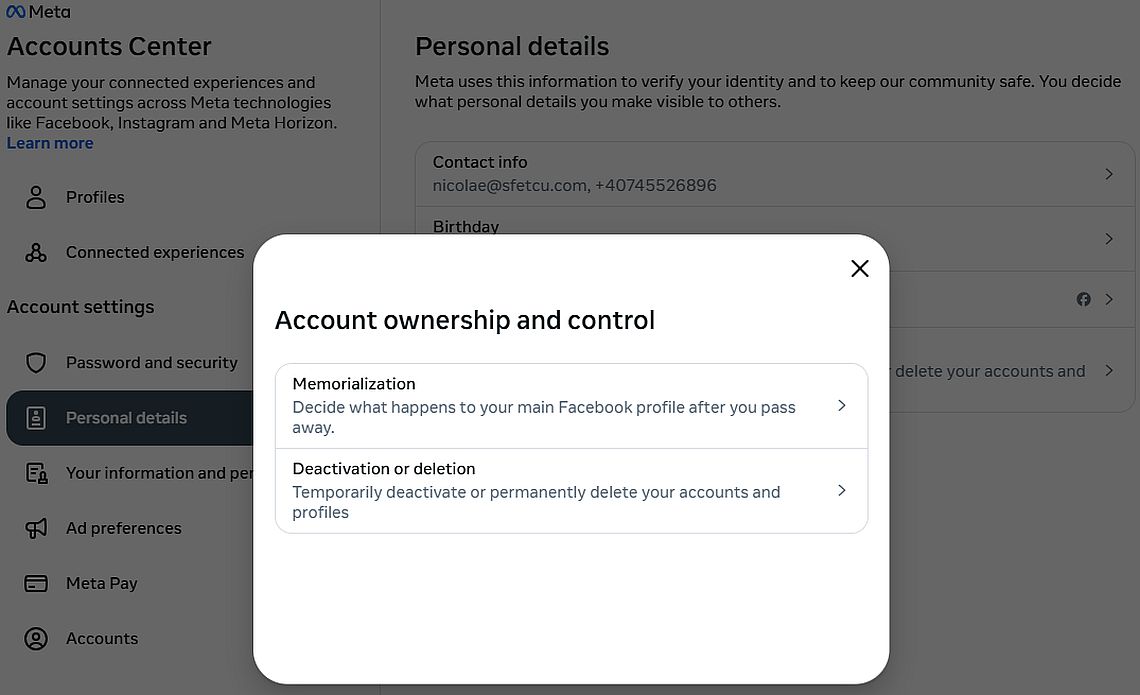
- Accounts Center → Personal details → Account ownership and control → Deactivation or deletion.
- Choose the account → Delete account → follow the prompts and confirm with your password.
On a computer (instagram.com):
- Click More (bottom left) → Settings → Accounts Center.
- Personal details → Account ownership and control → Deactivation or deletion → select the account → Delete account and confirm.
What to expect after you request deletion
- Your profile becomes invisible immediately. You can cancel deletion by logging back in within 30 days. After that window, your account is gone; full data removal from active systems may take up to 90 days.
Option B — Take a break: temporarily deactivate your account
Deactivation hides your profile, posts, comments, and likes until you log back in.
App or browser (via Accounts Center):
- Accounts Center → Personal details → Account ownership and control → Deactivation or deletion → choose your account → Deactivate account and confirm.
Good to know
- You can only deactivate once per week. Logging back in reactivates the account instantly.
FAQs
- Is deletion really permanent?
Yes—after the 30-day grace period, it’s irreversible. Instagram also notes the service can take up to 90 days to finish removing data from its systems, with limited backups retained for safety/legal reasons. - Will my username be available again?
It might be released at some point, but there’s no guarantee you can reclaim it after deletion. (Instagram doesn’t commit to a timeline publicly.) - Does deleting Instagram affect Threads?
Yes—your Threads profile tied to that Instagram account is removed when you delete Instagram. Deleting Threads alone doesn’t impact Instagram. - Can I do all this from the app?
Yes—the current flow runs through Accounts Center in the Instagram app or a web browser; wording may vary slightly by region and app version.
Quick checklist
- Exported my Instagram data from Accounts Center.
- Told close contacts how to reach me elsewhere.
- Chose Delete (permanent) or Deactivate (temporary).
- Aware of the 30-day reversal window and 90-day backend cleanup.
- If I use Threads, I know it will go too if I delete Instagram.
Discover more from MultiMedia
Subscribe to get the latest posts sent to your email.


Leave a Reply