




Facebook has been one of the most widely used social media platforms for years, but not everyone wants to keep their account forever. Whether you’re concerned about privacy, want to take a break from social media, or simply don’t use Facebook anymore, you have two main options: deactivate your account temporarily or delete it permanently.
This guide walks you through both processes.
Deactivation vs. Deletion: What’s the Difference?
Deactivating your account:
- Your profile is hidden from other users.
- You can reactivate your account anytime by logging back in.
- Messenger remains active unless you disable it separately.
- Your posts, photos, and data are saved.
Deleting your account:
- Your profile, photos, posts, and all activity are permanently removed after a 30-day grace period.
- You won’t be able to retrieve your account once deletion is finalized.
- Messenger and connected apps (e.g., Spotify, Instagram logins) will no longer work with your Facebook login.
How to Deactivate Your Facebook Account
- Log in to your Facebook account.
- Click the downward arrow (top-right corner on desktop) or open the menu (on mobile app).
- Go to Settings & Privacy > Settings.
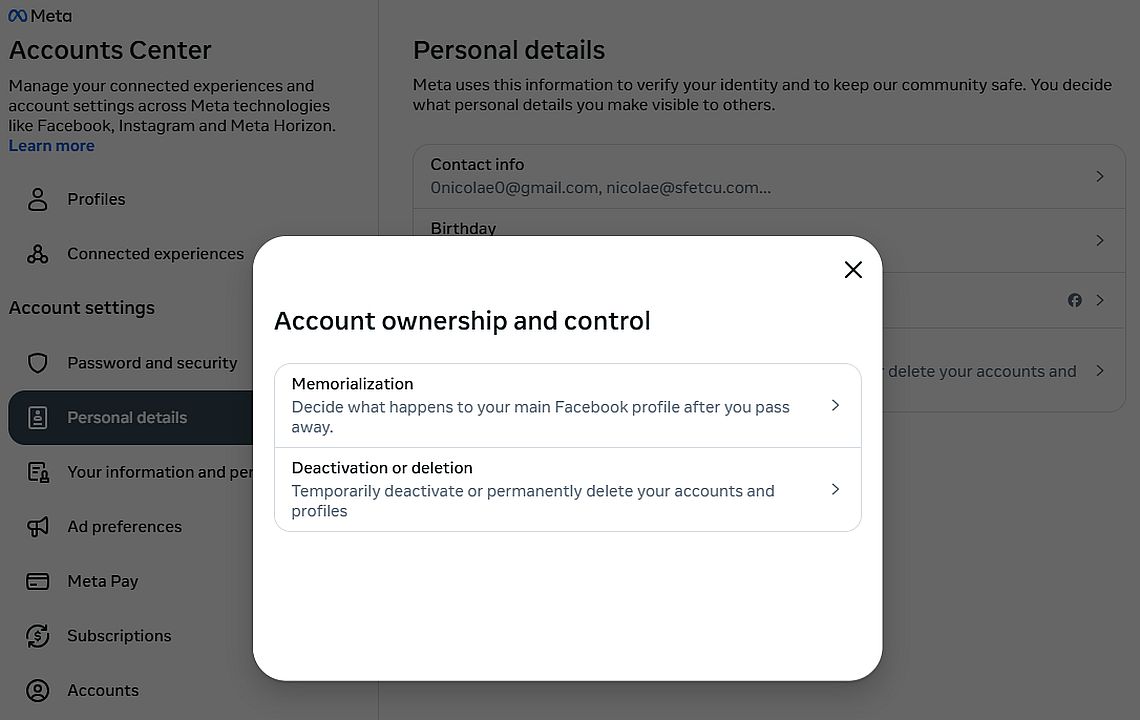
- Navigate to Accounts Center > Personal Details > Account Ownership and Control.
- Select Deactivation or Deletion.
- Choose Deactivate Account and follow the instructions.
Your account will be hidden until you decide to log back in.
How to Permanently Delete Your Facebook Account
- Log in to your account.
- Open Settings & Privacy > Settings.
- Go to Accounts Center > Personal Details > Account Ownership and Control.
- Select Deactivation or Deletion.
- Choose Delete Account and click Continue to Account Deletion.
- Follow the prompts and confirm.
Important Steps Before Deleting
- Download your data: Go to Settings & Privacy > Settings > Your Information > Download Your Information. You can download photos, posts, and messages before deleting.
- Disconnect apps and logins: Many people use Facebook to log in to other apps (like Instagram, Spotify, or online games). Switch those logins to email/Google before deletion.
- Messenger users: Deleting Facebook also deletes Messenger. If you want to keep Messenger, choose deactivation instead.
What Happens After You Delete?
- Your account enters a 30-day recovery period. If you log in within this time, you can cancel deletion.
- After 30 days, your profile and data are permanently removed.
- Backups may remain in Facebook’s servers for up to 90 days, but they aren’t accessible to other users.
Deleting your Facebook account is a big step, especially if you’ve used the platform for years. Take the time to back up your photos, messages, and important information before doing so. If you’re unsure, deactivation may be a safer first step.
But if you’re ready to step away permanently, following the steps above will help you delete your Facebook account once and for all.

Philosophical Essays
Challenge your mind and reshape your perspective on science and philosophy.

Information and Communications Technology in Romania – Comparative Analysis with the EU, Social Impact, Challenges and Opportunities, Future Directions
Perfect for policymakers, researchers, and ICT enthusiasts ready to explore Romania’s potential in the European digital sphere.

About Christmas
A free, fascinating deep-dive into the traditions, history, and spirit of the world’s most beloved holiday.
Discover more from MultiMedia
Subscribe to get the latest posts sent to your email.





Leave a Reply